How to centralize tasks, projects and processes in a single tool?
TL;DR
Centralizing tasks, projects and processes in a single tool revolutionizes team productivity. This guide explores available solutions, with a particular focus on Kantree, and offers a step-by-step implementation method to optimize your project management.
Table of contents
- The challenges of modern project management
- Why centralize your tasks and processes?
- Comparison of available project management tools
- Kantree: the optimal solution for centralization
- Step-by-step implementation guide
- Best practices for task organization
- Process optimization through centralization
- Frequently asked questions
- Conclusion
In an increasingly complex professional environment, task centralization is a major challenge for modern companies. Teams juggle multiple tools daily, waste time searching for dispersed information and struggle to maintain a global vision of their projects.
This fragmentation of processes generates costly inefficiencies: according to a recent study, 78% of French companies have implemented at least one collaborative workflow tool, yet many continue to suffer from a lack of coordination. The solution? Adopting a centralized approach that gathers all project activities in a unified environment.
This article guides you through this centralization process, exploring available solutions and providing a concrete method to transform the way you work.
The challenges of modern project management
Project management becomes smoother with a centralized tool, but it’s essential to understand current challenges. Modern teams face recurring issues that directly impact their effectiveness.
Dispersion of information
The first obstacle lies in the scattering of project data. Teams use an average of 5 to 7 different tools: emails for communication, spreadsheets for tracking, specialized tools for certain tasks, and storage platforms for documents. This multiplication of information sources wastes a considerable amount of time and increases error risks.
Lack of visibility
Without centralized visibility, managers struggle to evaluate real project progress. Status reports become obsolete as soon as they are created, and strategic decisions are based on partial information. This leads to delays, budget overruns and general team frustration.
Collaboration issues
Effective collaboration requires shared access to project information. When data is dispersed, teams work in silos, duplicates multiply, and coordination becomes a constant challenge. Meetings turn into update sessions rather than strategic discussions.
Why centralize your tasks and processes?
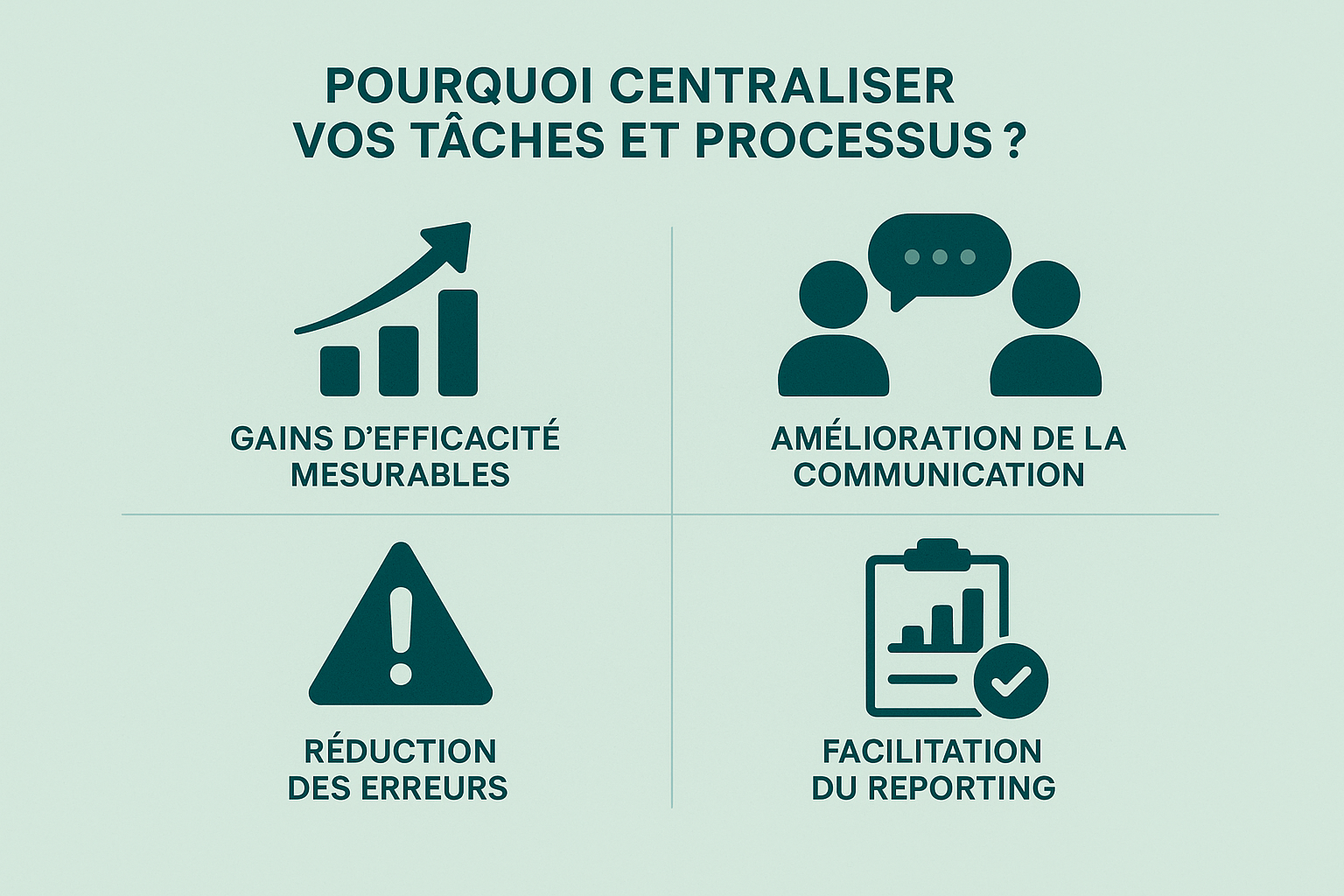
An effective strategy for task centralization can significantly improve team productivity. The benefits of this approach appear at multiple levels and fundamentally transform the way organizations manage their projects.
Measurable efficiency gains
Centralization eliminates time wasted switching between tools. Teams report a 30% reduction in time spent on administrative tasks when adopting a unified solution. This increased efficiency translates into more time available for value-added activities.
Improved communication
When all project information is accessible in the same place, communication naturally becomes more fluid. Teams can follow discussions, access relevant documents, and understand the context behind decisions without constantly asking colleagues.
Error reduction
Centralization drastically reduces errors linked to outdated or incomplete data. With a single source of truth, all team members work with the same up-to-date and reliable information.
Easier reporting
Tracking reports become automatic and real-time. Managers can instantly access important metrics, identify potential bottlenecks and make informed decisions without waiting for weekly updates.
Comparison of available project management tools
Choosing the right project management tool directly influences the results of your centralization initiative. Today’s market offers numerous solutions, each with its strengths and limitations.
| Tool | Strengths | Limitations | Ideal for |
|---|---|---|---|
| Kantree | Flexible views (Kanban, Gantt, calendar); advanced customization; powerful automation; French no-code solution | Less known than market leaders | Teams seeking simplicity + power, specific business needs |
| ClickUp | Very rich, numerous integrations | Complex to learn | Expert teams |
| Notion | Knowledge centralization, highly customizable | Steep learning curve | Documentation, hybrid organization |
| Monday.com | High customization level; highly rated | High cost | Structured organizations |
| Trello | Very simple, ideal for beginners | Quickly limited for complex projects | Small teams |
| Jira | Reference for agile technical teams | Not very accessible to non-developers | IT teams |
| Wrike | Advanced collaboration | Interface considered cluttered | Structured teams |
Generalist solutions
ClickUp positions itself as an all-in-one solution with over 1000 integrations. The tool offers extensive functionalities but may seem complex for teams seeking simplicity.
Notion excels at knowledge centralization thanks to its advanced customization. However, its learning curve can be intimidating for some users.
Monday.com earns a 9/10 in industry comparisons due to its customization capacities, but its cost may be prohibitive for small structures.
Specialized tools
Trello remains popular due to its simplicity, particularly suitable for teams new to project management. However, its limitations become apparent quickly for complex projects.
Jira dominates the agile teams segment but remains highly technical and less accessible for non-developers.
Wrike offers advanced collaboration functions with a rating of 7/10, but its interface may seem overloaded.
The rise of solid French solutions
In this competitive landscape, some solutions stand out thanks to a balanced approach between power and ease of use. This is notably the case for Kantree, which offers a unique approach to centralization, as a no-code management solution.
Kantree: the optimal solution for centralization
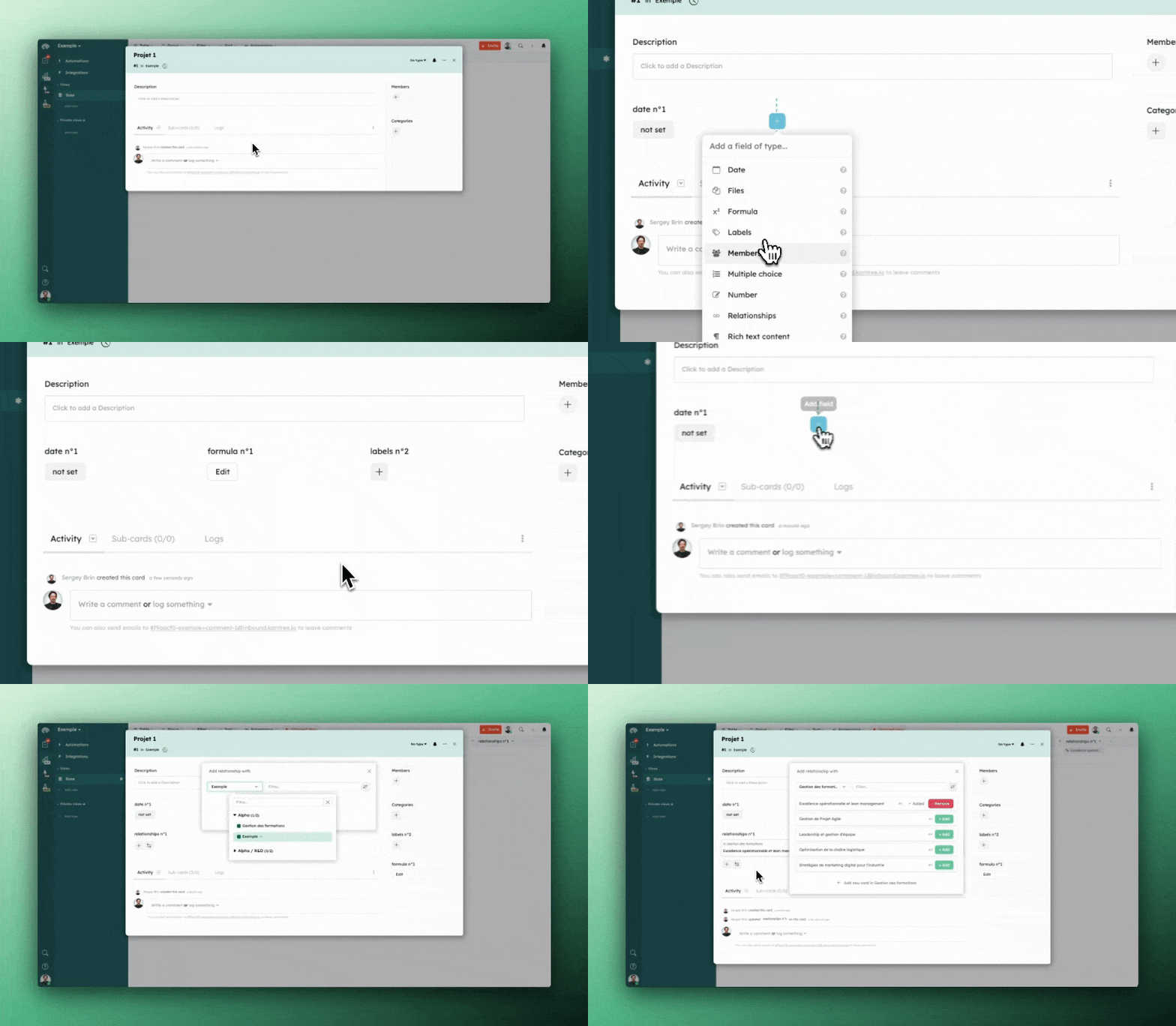
Everything is flexible in Kantree, allowing you to create exactly the task organization you want.
Kantree stands out in the world of project management tools thanks to its user-centered philosophy and its ability to adapt to the specific needs of each team. This French solution proposes an innovative approach to centralization that deserves particular attention.
An intuitive and powerful interface
One of Kantree’s main strengths is its ability to offer customizable views (Kanban, Gantt, calendar) without sacrificing ease of use. Teams can switch between views as needed, whether for daily tactical work or long-term strategic planning.
This visual flexibility is complemented by customizable fields for cards, allowing each organization to tailor the tool to its specific business processes rather than changing its work habits.
Smart workflow automation
Kantree particularly excels at workflow automation with advanced features that significantly reduce administrative load. The system enables automated actions based on customizable triggers, recurring card creation, and smart notification management.
Automation also extends to task assignment, allowing teams to focus on core work rather than administrative project management.
Integration and scalability
The platform offers carefully selected third-party integrations, avoiding excessive complexity while providing essential connections. Workspace templates and forms simplify onboarding and process standardization.
Distinct competitive advantages
Unlike competitors who prioritize either simplicity or power, Kantree successfully combines both. Where Trello shows limitations on complex projects and ClickUp can overwhelm with its functional richness, Kantree offers balanced power.
The solution also stands out thanks to its adaptability: it grows with the organization without requiring migration to a more powerful tool. This scalability offers significant economic and organizational benefits.
User feedback
Teams adopting Kantree report noticeable improvements in operational efficiency, with a significant reduction in time spent searching for information. Collaboration naturally improves thanks to centralized communication and greater project visibility.
Step-by-step implementation guide
Project planning improves considerably with centralization, but success depends on a methodical implementation. Here is a structured approach to help you successfully transition to a centralized tool.
Phase 1: Audit and preparation
Start by mapping your current processes. Identify all tools used, existing information flows and recurring pain points. This analysis often reveals unexpected inefficiencies and guides configuration choices.
Then define your specific objectives: reducing reporting time, improving collaboration, automating tasks. These objectives will serve as evaluation criteria for successful implementation.
Phase 2: Configuration and customization
Configure your tool respecting existing business processes while identifying improvement opportunities. Create workspaces, define workflows and set up basic automations.
This phase requires a progressive approach: begin by reproducing your current processes and only then introduce optimizations. This method facilitates team adoption and reduces resistance to change.
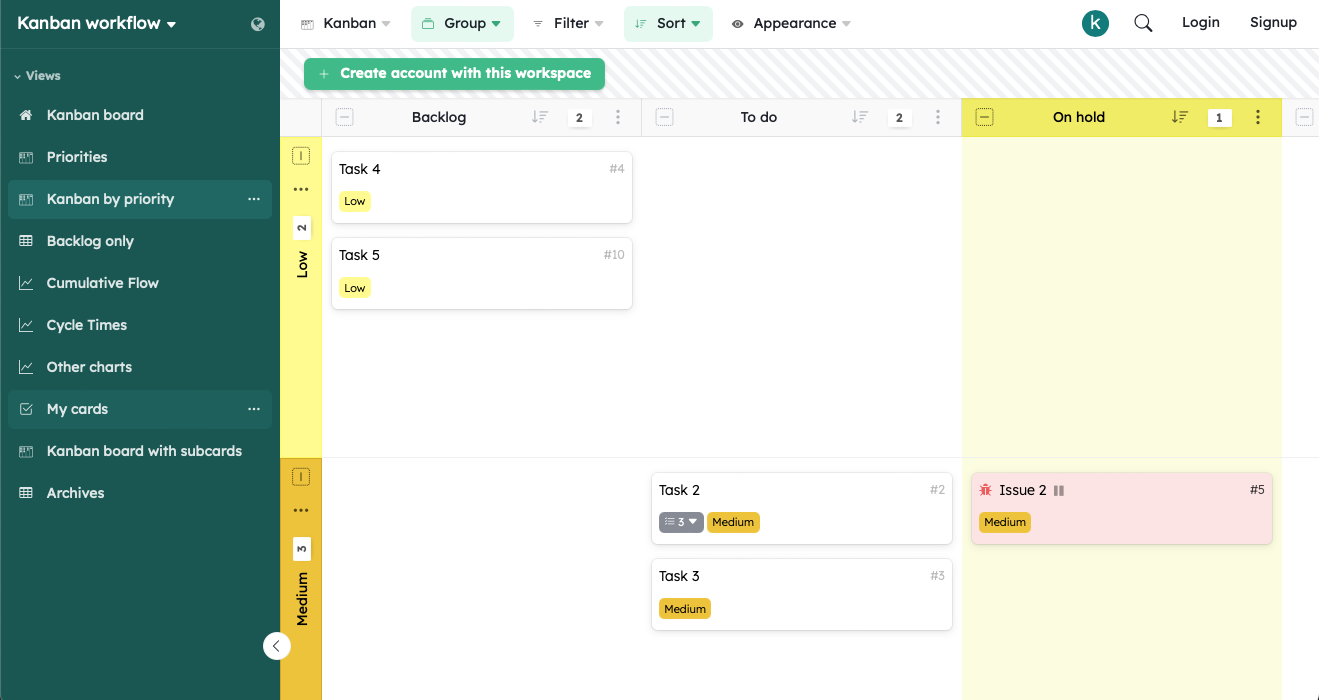
☝️ Click the image above to get your Kanban template, one of the most widely used within Kantree.
Phase 3: Training and support
Organize training sessions adapted to different user profiles. Managers must master reporting and tracking features, while contributors focus on daily task management.
Assign ambassadors in each team to support adoption and collect feedback. These roles are essential to quickly identify issues and adjust configuration when needed.
Phase 4: Progressive rollout
Deploy the solution team by team or via a pilot project before generalization. This approach helps refine configuration, fix technical issues and leverage early successes to convince hesitant teams.
Regularly measure indicators defined in phase 1 to validate progress and identify continuous improvement opportunities.
Best practices for task organization
Task organization becomes intuitive with the right tools, but certain practices maximize the effectiveness of your centralized system. These recommendations are based on the experience of teams that have successfully transformed their workflows.
Clear hierarchical structure
Establish a logical hierarchy for your projects and tasks. Use consistent naming conventions and create categories reflecting your business structure. This improves navigation and search efficiency.
Process standardization
Define templates for recurring project types. Standardization accelerates new project creation and ensures consistency. Teams gain autonomy and deliverable quality improves.
Proactive priority management
Implement a clear and shared prioritization system. Whether using the Eisenhower matrix, MoSCoW method or a custom scoring system, the important thing is that all team members apply the same criteria.
Integrated communication
Centralize project discussions within the tool rather than in separate emails. This keeps decision context accessible and eases onboarding of new team members.
Continuous monitoring and adjustment
Organize regular retrospectives to evaluate system effectiveness. Needs evolve, teams grow, and your organization must adapt accordingly.
Process optimization through centralization

Process optimization requires standardized methods, and centralization provides the ideal framework. Gains become quickly measurable when teams adopt a structured approach.
Identifying bottlenecks
Centralization naturally reveals bottlenecks in your workflows. With full visibility, you quickly identify stages that slow down the entire value chain.
Automating repetitive tasks
Once processes are centralized, automation becomes possible and cost-effective. Administrative tasks, follow-up notifications and status updates can be automated, freeing time for creative activities.
Measurement and continuous improvement
Centralization facilitates real-time access to reliable metrics. Cycle times, completion rates, workload: these indicators guide improvement decisions.
Capitalizing on best practices
When processes are centralized, best practices from one team can be reused and adapted by others. This helps scale organizational expertise.
Frequently asked questions
How to choose between available tools?
The choice depends on several factors: team size, project complexity, budget and integration needs. Start by evaluating your current processes and identifying primary pain points. Then test solutions that best address those needs.
How long does it take to see results?
Initial efficiency gains generally appear within 2 to 4 weeks after implementation, provided a structured approach is followed. The most significant benefits appear after 2 to 3 months, once teams fully master the tool.
How to manage resistance to change?
Resistance is natural. Involve teams in the selection process, communicate expected benefits clearly and offer personalized support. Start with motivated teams to create early success stories.
Should all ongoing projects be migrated?
No, it’s best to start with new projects and progressively migrate ongoing ones based on priority and complexity. This reduces risks and facilitates learning.
How to measure ROI?
Measure time saved on administrative tasks, improved delivery timelines, reduced errors and increased team satisfaction. These quantitative and qualitative indicators demonstrate your investment’s value.
Conclusion
Centralizing tasks, projects and processes in a single tool is more than a technical optimization: it deeply transforms your way of working. Benefits quickly appear across projects—from improved collaboration to reduced errors.
Success relies on three pillars: choosing the right tool, implementing it methodically and supporting change effectively. Among available solutions, Kantree stands out by balancing power and simplicity, offering teams a scalable environment.
Investment in centralization leads to fast measurable returns: time savings, quality improvements and strengthened collaboration. In a context where operational efficiency is a decisive competitive advantage, this transformation is no longer optional.
Start today by auditing your processes and identifying priority needs. Centralization awaits you—and its benefits will exceed your expectations.
To go further
3 possibilities are available to you if this subject interests you:
If you found this article useful, consider sharing it. You can do so easily below.