Kantree 10.9 and 10.10: the new features that change your project management

TL;DR
Kantree is rolling out two major updates in April and June 2026. Version 10.9 introduces card templates, conditional formatting, a performance mode for large workspaces and a native Jira importer. Version 10.10 consolidates these gains with a new import panel, improvements to the automation editor and significant performance gains. The result: a faster, more flexible platform that is easier to adopt for teams of all sizes.
Table of contents
- What changes with Kantree 10.9 and 10.10
- Card templates: save time on creation
- Conditional formatting: visualize your priorities at a glance
- Gantt view: new options to manage your projects
- Automations: more power, less friction
- Jira import: migrate without losing your data
- Performance: Kantree holds up on large workspaces
- Bug fixes summary
- FAQ
- Conclusion
Since the beginning of 2026, Kantree has accelerated its deployment pace. Versions 10.9 (April 6, 2026) and 10.10 (June 1, 2026) bring a set of long-awaited features for teams managing complex projects: reusable templates, conditional card color-coding, enriched Gantt views and a Jira importer directly integrated into the platform.
This article reviews each new feature, explains concretely what it is for and shows you how to make the most of it today.
What changes with Kantree 10.9 and 10.10
Both versions follow the same logic: making Kantree more powerful without making it more complex. Three main themes run through these updates:
- Productivity: card templates, conditional formatting, new creation options in views
- Performance: faster loading, performance mode for dense workspaces, optimized queries
- Migration: native Jira importer and new import panel in settings
Card templates: save time on creation
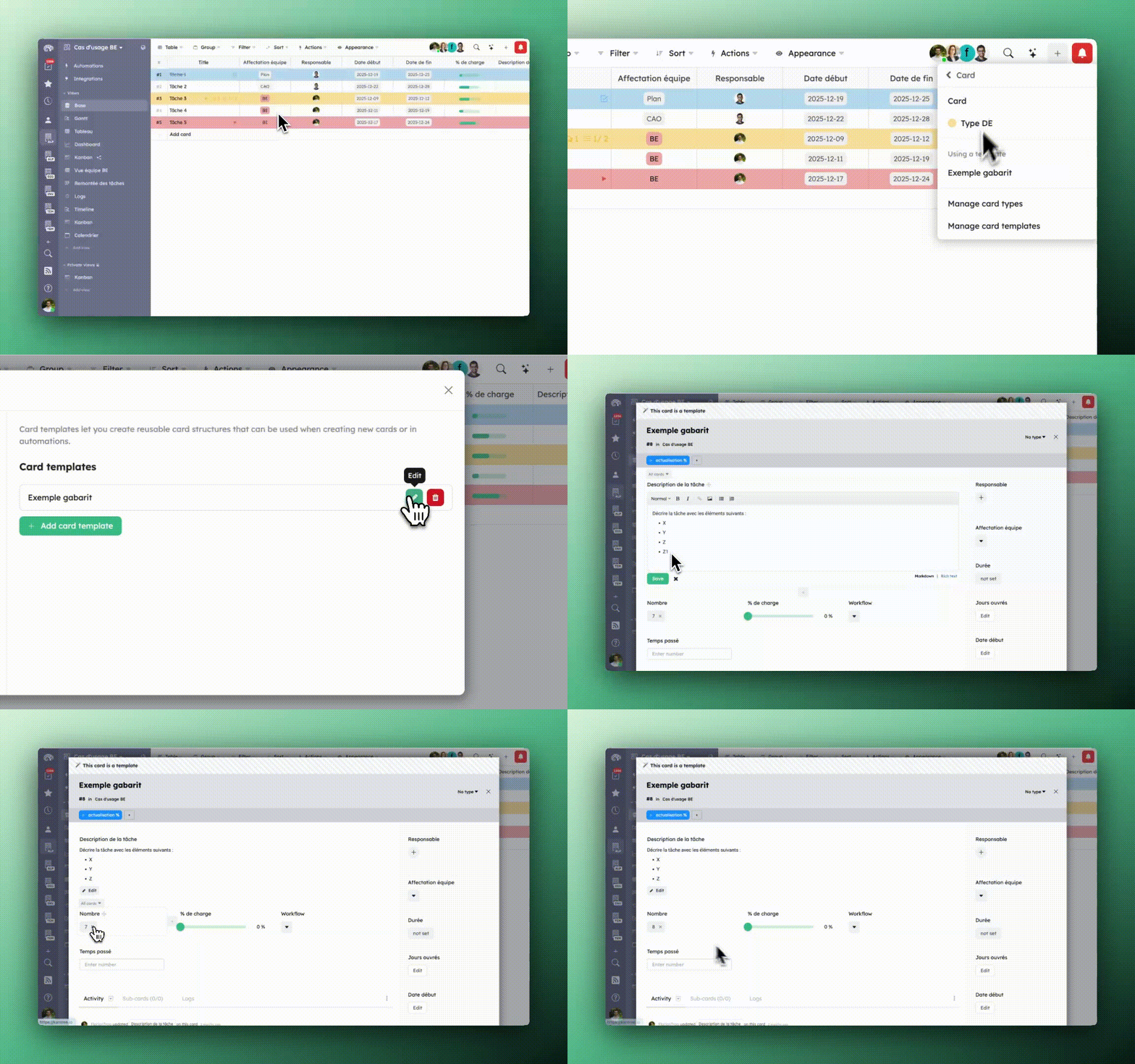
This is one of the most anticipated features of version 10.9. It is now possible to create reusable card templates directly in a workspace.
How it works
Templates are accessed from the + menu in the top right of the workspace. Once the template is selected, a new card is created with the predefined structure: fields, sub-cards, description, card type.
Templates can also be used in automations, via the “Create a card” action. This opens up interesting possibilities for repetitive workflows: automatically creating a structured card when a specific trigger occurs (new request, sprint start, etc.).
It is also possible to copy sub-cards from a template to any existing card, which makes it easier to duplicate structures without having to recreate each element.
What this changes in practice
For teams managing standardized processes (onboarding, sprint review, bug tracking), templates ensure a consistent structure without relying on the memory or discipline of each member.
Conditional formatting: visualize your priorities at a glance
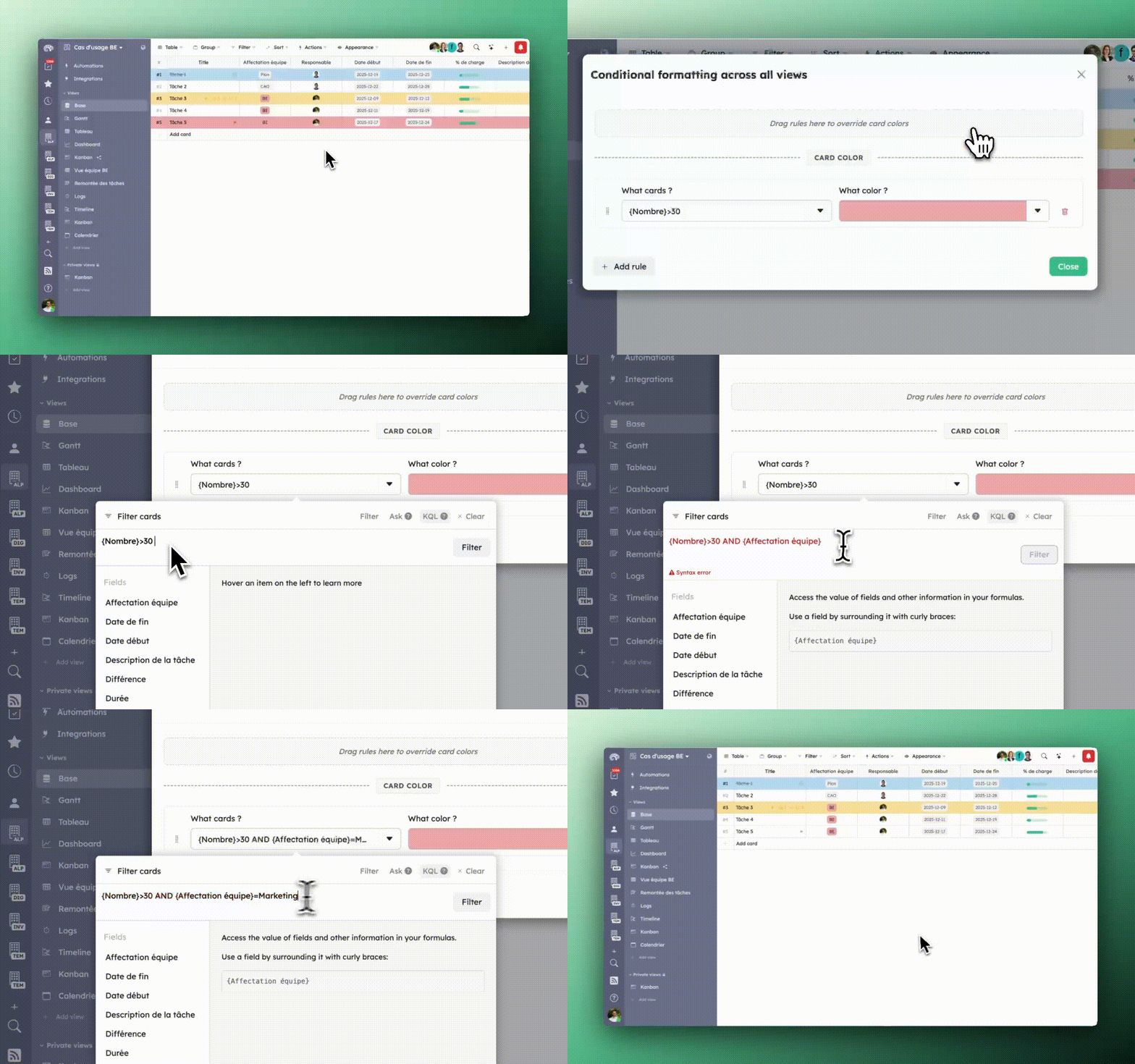
Version 10.9 introduces two levels of visual card customization.
Individual color per card
Each card can now receive a custom color, independently of its type or fields. Useful for visually flagging a particular item without having to modify the workspace structure.
Conditional formatting rules
More powerful still: it is possible to define automatic color rules at the workspace level. A card changes color based on defined conditions (field value, status, date, assignment…).
This feature is particularly useful in Kanban and table views, where a clear color code makes it easy to spot at a glance cards that are overdue, high priority or blocked.
Note: conditional formatting currently applies at the workspace level.
Gantt view: new options to manage your projects
The Gantt and Portfolio views, available for enterprise accounts since version 10.9.2, continue to be enriched.
“Prevents overlaps” option
Added in version 10.9.1, this option prevents task bars from visually overlapping in the Gantt view. A small detail that makes a big difference when managing dense schedules with many parallel tasks.
Automations: more power, less friction
Automations have been the subject of continuous improvements over several versions. Kantree 10.9 and 10.10 bring several concrete developments.
Required variables on manual rules
It is now possible to define required variables on manual automation rules. Concretely:
- If a necessary variable is absent, the rule does not trigger
- A form is automatically displayed to ask the user for the missing information before execution
This is an elegant mechanism to avoid incomplete executions and guide users without having to create separate documentation.
Simplification of the “Create a card” action
The parent option in the “Create a card” action is deprecated in favor of a clearer interface. The automation editor in version 10.10 also improves the display of obsolete options to facilitate the transition.
Synchronous execution of simple automations
In version 10.10, simple automations triggered manually now execute synchronously. The response is immediate, with no waiting time linked to an asynchronous processing queue.
Jira import: migrate without losing your data
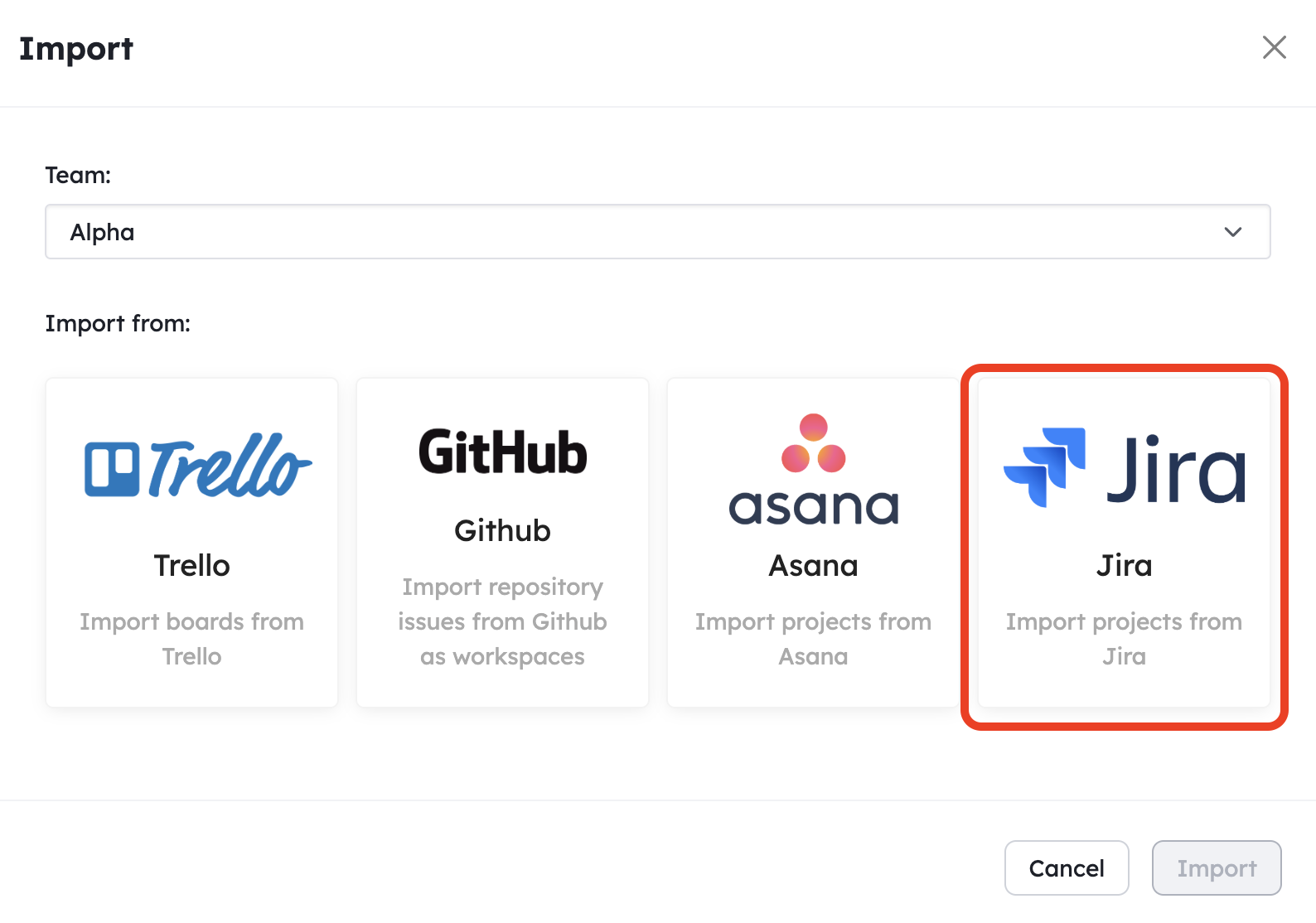
Version 10.9 introduces a native Jira importer, and version 10.10 adds a dedicated import panel in the workspace settings.
What the Jira import covers
The importer allows you to transfer your Jira projects to Kantree while preserving the data structure. For teams considering a migration following the end of Jira on-premise support in 2029, this is a concrete entry point for testing the transition without risk.
If you are evaluating Kantree as an alternative to Jira on-premise, the native importer eliminates one of the main friction points when switching from one tool to the other.
The new import panel
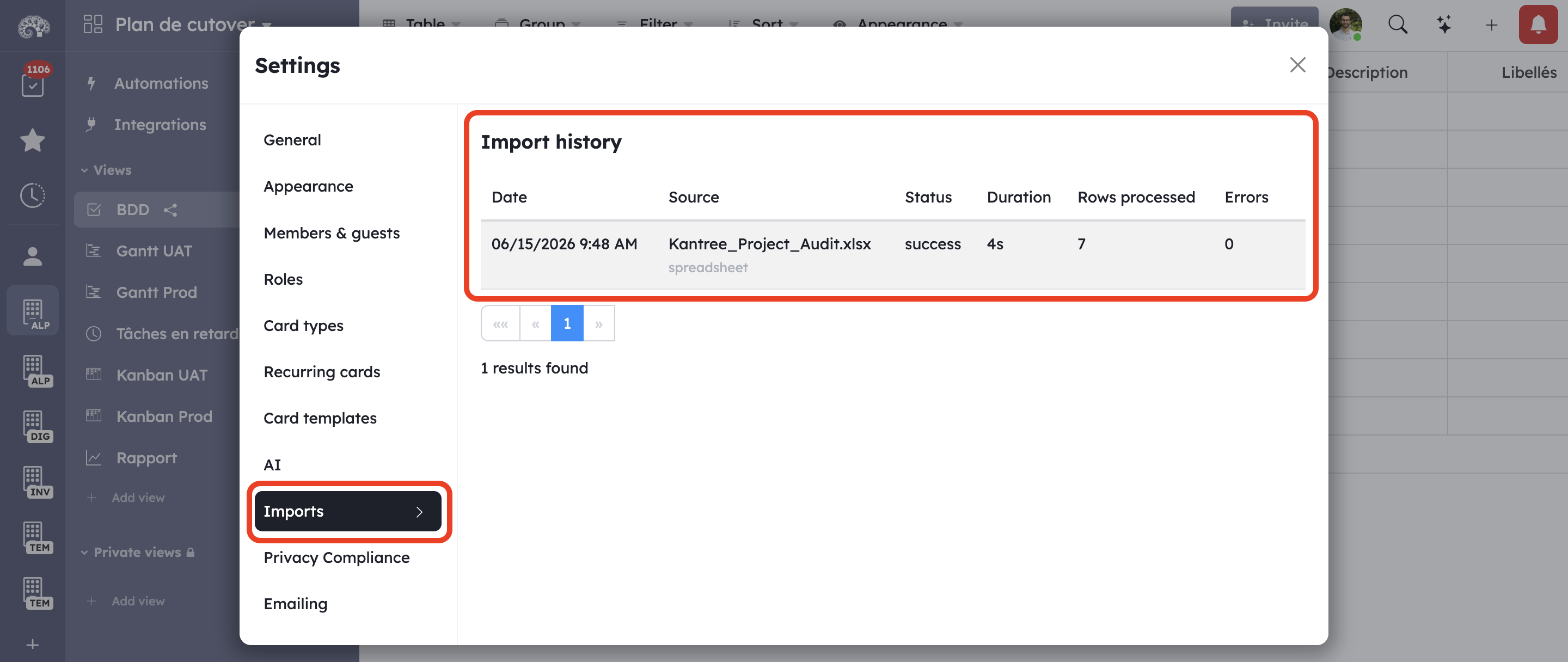
In version 10.10, a panel dedicated to import is accessible directly from the workspace settings. The interface centralizes import options and simplifies the process for administrators.
Performance: Kantree holds up on large workspaces
Teams managing several thousand cards in the same workspace benefit from targeted improvements in both versions.
Performance mode for large tables
The table view has a new performance mode that can be enabled from the appearance menu. This mode disables certain interactions to prioritize fluidity, and allows thousands of cards to be managed without degradation.
Loading screen for large workspaces
A loading screen now appears when opening a workspace containing more than 3,000 cards. Simple, but useful to avoid the impression that the application is stuck during initial loading.
Other performance gains
- Faster card loading in workspaces
- Long queries and full-text search optimized
- Improved loading in Gantt views during navigation
FAQ
Are card templates available on all plans? Card templates are available from version 10.9. For availability details based on your plan, check the pricing page or contact the Kantree team.
Does the table view performance mode disable important features? Performance mode disables certain interactions to improve fluidity on very large workspaces. It is designed for extreme cases (thousands of cards) and remains optional.
Does conditional formatting work in all views? For now, conditional formatting rules apply at the workspace level. They are therefore visible in all views of that workspace.
Does the Jira importer handle sub-tasks and attachments? The native Jira importer is designed to preserve the structure of your projects. For complex cases, the Kantree team supports the migration during the initial audit.
How do I enable performance mode in the table view? From the table view, open the appearance menu and enable the “performance mode” option.
Conclusion
Versions 10.9 and 10.10 of Kantree mark a significant step in the maturity of the platform. Card templates and conditional formatting address concrete needs expressed by teams. Performance improvements on large workspaces remove a real barrier for organizations managing large volumes of tasks. And the native Jira importer concretely simplifies the migration path for teams looking for an alternative to Jira.
To discover these features for yourself, the 15-day free trial gives access to the entire platform, with no credit card required.
Try Kantree for free
Access all the new features today: card templates, conditional formatting, Jira import and much more.
15-day free trial • No credit card required
To go further
3 possibilities are available to you if this topic interests you:
-
1
Try Kantree here, it is free and you don’t need any credit card
-
2
If you want to learn more about how Kantree can adapt to your challenges, make an appointment with an expert on your use case.
-
3
Are you willing to join +1500 professionals receiving our advices and news on digitalization, collaboration, productivity? Register to our newsletter here.
If this article has been useful to you, consider sharing it. You can do it easily below.