The real cost of Jira for a small business: license, plugins, maintenance

TL;DR
The sticker price of Jira (starting at $7.91 per user per month on the Standard plan) only reflects part of the real cost of Jira for a small business. Once you add the marketplace plugins that fill in the gaps, the time spent on admin, and the yearly price increases, the real cost typically climbs to 2 to 3 times the base license price. For a 20-person team, the total bill can go from a seemingly modest $1,900 a year to more than $4,500 once the hidden costs are factored in. This article breaks down each spending line and gives you concrete benchmarks to build a realistic budget, with Kantree as a comparison point offering more predictable pricing.
Table of contents
- What Jira’s pricing page actually shows you
- Marketplace plugin costs, the real hidden variable
- Maintenance and admin overhead
- A worked example for a 10, 20 and 50-user team
- Jira Data Center: not an option for a small business
- How to cut the bill without losing functionality
- FAQ
- Conclusion
When a small business budgets for Jira, the instinct is to multiply the number of users by the price shown on Atlassian’s pricing page. That calculation is incomplete, and it’s exactly what causes bad surprises later in the year. The real cost of Jira for a small business adds up three separate items: the license itself, the marketplace extensions needed to close the gaps in the native tool, and the human time spent administering and evolving the configuration.
This article breaks down each item with up-to-date figures, so a small business can build a budget that doesn’t shrink by half halfway through the year.
What Jira’s pricing page actually shows you
The four Jira Cloud plans
Jira Cloud has four plans. Free is free for up to 10 users, with strict limits: 2 GB of storage, 100 email notifications a day, and 100 automation rule runs a month. It doesn’t offer any fine-grained per-project permissions, which makes it a poor fit as soon as several teams share the same instance.
The Standard plan, the one every small business is mechanically pushed toward once it passes 10 users, costs $7.91 per user per month billed monthly (around $6.52 on an annual commitment). Premium goes up to $14.54 per user per month, adding unlimited storage, 24/7 support, and Atlassian’s AI features. Enterprise, quoted on request, targets organizations with several hundred users and falls outside the small business scope.
These prices are listed in dollars and change every year. Converted to euros at the current exchange rate, that’s roughly €7.30 per user per month for the Standard plan, an order of magnitude to adjust based on the exchange rate at the time you subscribe rather than a fixed value.
The per-user price drops with volume, but not below the small business threshold
The per-user rate goes down as headcount grows, but that discount mostly benefits large organizations. A small business with 15 to 50 users stays on the least favorable pricing tiers, without the volume discounts negotiated by accounts with several hundred licenses.
Marketplace plugin costs, the real hidden variable
Why a small business almost always ends up paying for extensions
Native Jira doesn’t cover several needs that come up constantly for a small business: time tracking, mandatory checklists on tickets, consolidated advanced reporting, test management. Each of these needs is solved by a paid Atlassian Marketplace extension, each with its own per-user, per-month pricing.
Taken individually, these extensions look harmless, typically between $1 and $5 per user per month each. But a small business that activates just three extensions (time tracking, checklist, reporting) can see its monthly bill increase by 20% to 50% over the list price of the license alone.
A concrete stacking example
For a 20-person team on the Standard plan, adding three extensions at $3 per user per month each adds $180 a month, or more than $2,100 a year, on top of the $1,900 license cost. The real cost doubles in this example, without any change of plan whatsoever.
Maintenance and admin overhead
What Jira Cloud doesn’t bill you for, but that still costs money
Jira Cloud is managed by Atlassian, which removes the server infrastructure burden. But configuration stays on the small business’s plate: building and maintaining workflows, managing permissions, updating field schemas, resolving conflicts between marketplace extensions during version upgrades. This admin time is rarely priced in at purchase time, even though it represents a real cost in internal salary or outside contracting.
In practice, Jira administrators often spend several hours a week maintaining the instance as soon as the organization has more than a handful of active projects, and that time grows with the number of installed extensions.
The compounding effect of yearly price increases
Atlassian adjusts its cloud prices on a regular cadence. A small business that budgets based on the current year’s rate risks seeing its budget line grow every year with no change in functional scope. It’s safer to build in an annual increase margin into any three-year projection.
A worked example for a 10, 20 and 50-user team
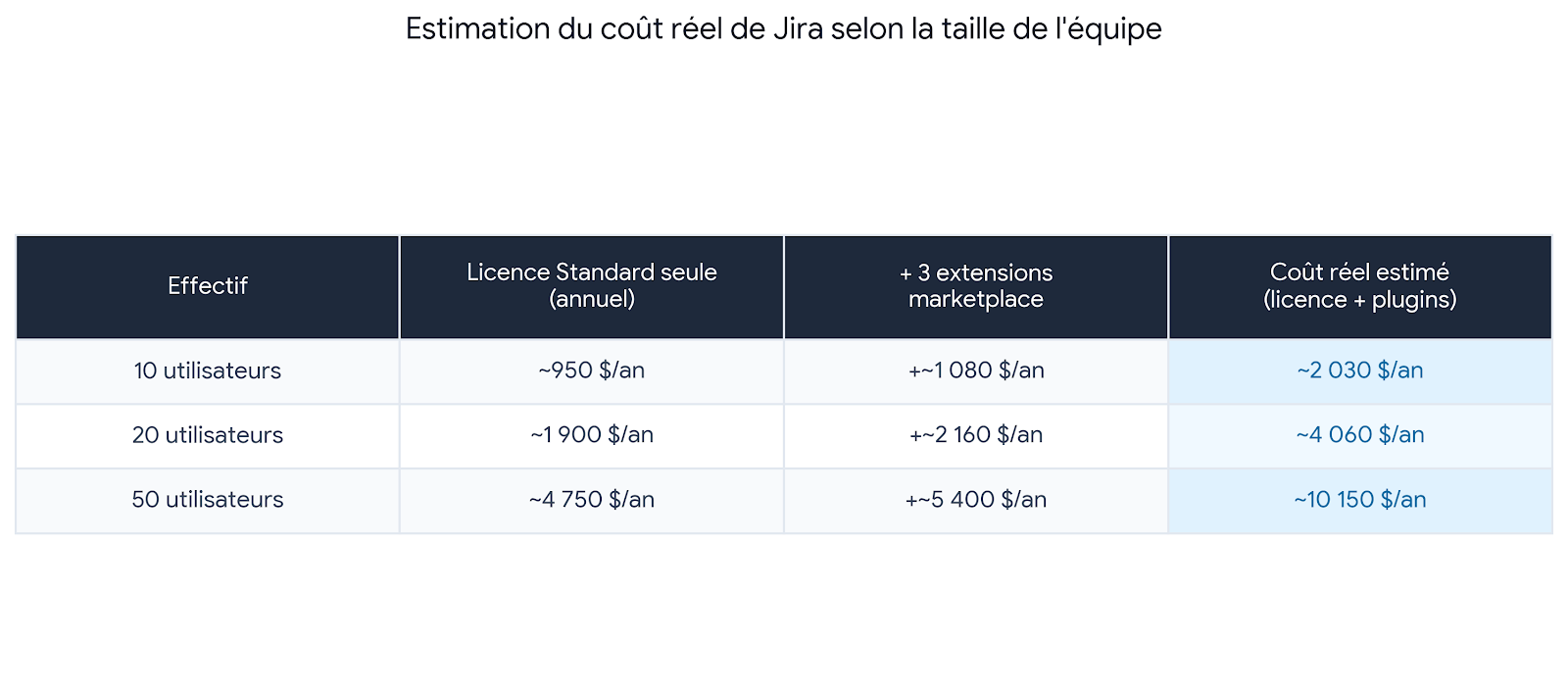
These figures deliberately exclude internal admin time, which adds a further cost that a plain software invoice doesn’t capture. They also exclude Confluence, often needed alongside Jira for documentation, and billed separately starting at around $6 per user per month.
Jira Data Center: not an option for a small business
Some small businesses still consider Jira’s self-hosted version to keep control of their infrastructure. That choice is structurally the wrong fit for their size: Data Center pricing starts around $51,000 a year, on tiers designed for organizations of 500 users and above, with a roughly 15% price increase applied in February 2026. On top of that come server infrastructure, backup, and system administration costs that Jira Cloud avoids entirely. Atlassian has also announced the complete end of support for Jira Data Center on-premise on March 28, 2029, which makes this investment a risky one over the medium term for an organization that doesn’t have the resources to absorb the migration that will follow.
How to cut the bill without losing functionality
Limit the number of active extensions
Before adding a marketplace extension, it’s worth checking whether the need can be covered natively through field or automation configuration. Every extension you avoid is one less budget line, every year.
Bring your needs into a single tool instead of stacking add-ons
This is exactly the angle Kantree takes: a no-code project management platform where time tracking, custom fields, automations and Kanban boards are included natively, with no marketplace of paid extensions to stack on top. Pricing is predictable from the moment you subscribe, with no hidden tier and no per-feature surcharge.
Ready-to-use templates let you get started without heavy setup: request management via form, OKR tracking, Scrum board, Kanban board and company overview.
Compare your current Jira budget
Try Kantree on your real projects and compare the bill directly, with no plugin to add to get back the features you already use.
Free trial • No credit card required
FAQ
What’s the base price of Jira for a small business? The Standard plan, the best fit once headcount passes 10 users, costs $7.91 per user per month billed monthly, or around $6.52 on an annual commitment.
Why does Jira’s real cost so often exceed the listed price? Because common small business needs, like time tracking, checklists or advanced reporting, aren’t included natively and require paid marketplace extensions, billed on top of the base license.
Is Jira Data Center a way to cut costs for a small business? No. Jira Data Center’s pricing tiers start around $51,000 a year and target organizations of 500 users and above, a scale that’s disproportionate for a small business. Support for this on-premise version also ends on March 28, 2029.
How much do the marketplace extensions you actually need typically cost? Each extension usually costs between $1 and $5 per user per month. Three common extensions can add 20% to 50% on top of the license cost alone.
Is there a Jira alternative with more predictable pricing? Yes. Kantree natively includes time tracking, custom fields and automations, with no marketplace of paid extensions to stack on top, which makes the budget predictable from the moment you subscribe.
Conclusion

Jira’s list price is only a starting point. The real cost of Jira for a small business is built by adding up the license, the marketplace extensions needed to cover otherwise common needs, and internal admin time. For a 20-user team, the gap between the announced budget and the actual bill can amount to several thousand dollars a year.
Before renewing or subscribing to Jira, it’s worth listing precisely which extensions you already need today and projecting their cost over three years. It’s also a good time to compare with alternatives offering more predictable pricing, such as Kantree, especially if your on-premise Jira instance is approaching its 2029 end of support.
Compare your current Jira budget
Try Kantree on your real projects and compare the bill directly, with no plugin to add to get back the features you already use.
Free trial • No credit card required
To go further
3 possibilities are available to you if this topic interests you:
-
1
Try Kantree here, it is free and you don’t need any credit card
-
2
If you want to learn more about how Kantree can adapt to your challenges, make an appointment with an expert on your use case.
-
3
Are you willing to join +1500 professionals receiving our advices and news on digitalization, collaboration, productivity? Register to our newsletter here.
If this article has been useful to you, consider sharing it. You can do it easily below.