AI and automation: how AI transforms your workflows
TL;DR
AI and workflow automation allow teams to shed repetitive tasks and focus on what truly creates value. With its native AI assistant, Kantree goes beyond simple project management: ask questions in plain language, create tasks, generate complex filters or extract data from your PDFs — without writing a single line of code. This guide explains how to put these features to work concretely in your organisation.
Table of contents
- Why AI is fundamentally changing workflow management
- The Kantree AI assistant: what it actually does
- Use cases: AI at the service of your business processes
- AI and automation in Kantree: how it works
- What AI does not replace (and why that’s good news)
- How to get started with the Kantree AI assistant
- FAQ: frequently asked questions
- Conclusion
Automating repetitive tasks is a promise as old as business software. For a long time, though, that promise came with a catch: you had to master complex rule languages, configure connectors, or call on a developer for every new requirement.
Artificial intelligence is radically shifting that balance. Today, an operations manager can describe what they want in plain language and their project management tool handles the rest. That is precisely the bet Kantree is making with its AI assistant, built natively into the platform.
This guide explores concretely what AI brings to workflow management and how to take advantage of it with no steep learning curve.
Why AI is fundamentally changing workflow management
From fixed rules to contextual understanding
Traditional automation works on a binary principle: if condition A, then action B. That is solid for stable, well-defined processes, but completely rigid the moment context changes.
AI-powered workflow automation goes further: instead of relying on “if-then” rules, it uses machine learning algorithms to analyse data, recognise patterns and continuously improve over time. An intelligent workflow can therefore handle unanticipated situations, adapt its responses to context and learn from past actions.
A measurable productivity accelerator
The benefits are now documented at scale. According to Salesforce, early adopters of generative AI save an average of 5 hours per week — the equivalent of one full month of work per year. For a team of ten, that is an entire resource freed up annually, with no additional hiring.
The goal is not to cut headcount, but to refocus every team member on the tasks that genuinely require their judgement, creativity and domain knowledge.
The Kantree AI assistant: what it actually does
Kantree has made a clear product philosophy choice: AI should serve people, not replace them. The AI assistant is designed to adapt to your existing workflows, not to force you to change them.
Here is what it lets you do on a daily basis.
Conversational assistant in plain language
No need to learn a technical language or dig through menus. Ask your questions in plain language, just as you would with a team member, to create cards, sort your tasks or generate reports in seconds.
In practice: “Create a high-priority task for the client report delivery by Friday” — the assistant understands, creates the card and assigns it if you specify. Zero configuration clicks.
Smart filters via the Ask tab
Creating complex filters is often one of the biggest barriers to adopting project management tools. With Kantree, you create complex filters in just a few words via the Ask tab.
Concrete example: “Show me all overdue tasks assigned to the product team this quarter” automatically generates the corresponding filter, without you having to manually configure each parameter.
Data extraction from your documents
This is one of the most powerful features for teams that receive a high volume of incoming documents. Upload a PDF — a quote, a CV, a report — and let Kantree AI summarise the key points and automatically import the information into your projects.
An HR manager can upload a CV and see the key information extracted directly into the candidate record. A project manager can import a specification document and get a pre-generated task list.
Intelligent global search
An intelligent search that understands the context of your projects lets you find any piece of information in your workspace instantly. It no longer looks only for exact keywords — it understands the intent behind your query.
Use cases: AI at the service of your business processes
Project management and task tracking
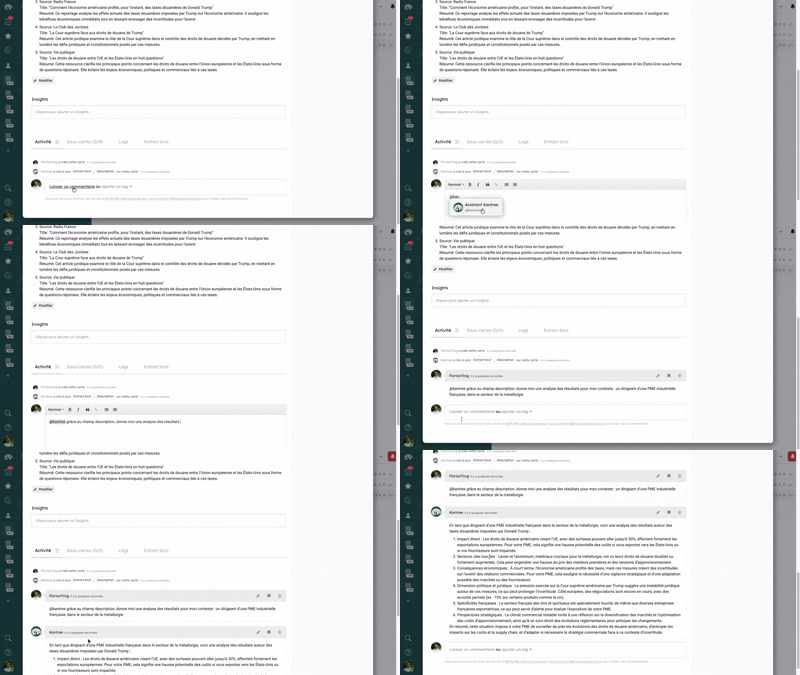
A project team receives weekly progress reports in PDF form from its contractors. With the Kantree AI assistant, they upload those documents and automatically extract deliverables, delays and blockers — which feed directly into kanban boards and tracking dashboards.
Result: the weekly steering meeting starts from an already consolidated overview, with no manual data entry.
Human resources and recruitment
The recruitment process generates a high volume of documents: CVs, cover letters, interview notes. The AI assistant extracts the key information from each file, structures it in Kantree and lets HR filter candidates in plain language: “Show me candidates with more than 5 years of React development experience, available before September.”
IT support and internal request management
An IT team receiving support tickets can use the AI assistant to automatically create a structured card from a free-text request, assign the right priority and route it to the appropriate team — while keeping the complete history in Kantree.
Reporting and data consolidation
Rather than spending an hour consolidating data from multiple projects to prepare a management report, the assistant generates a filtered summary view in seconds based on the desired criteria. The manager asks the question, the AI prepares the view.
AI and automation in Kantree: how it works
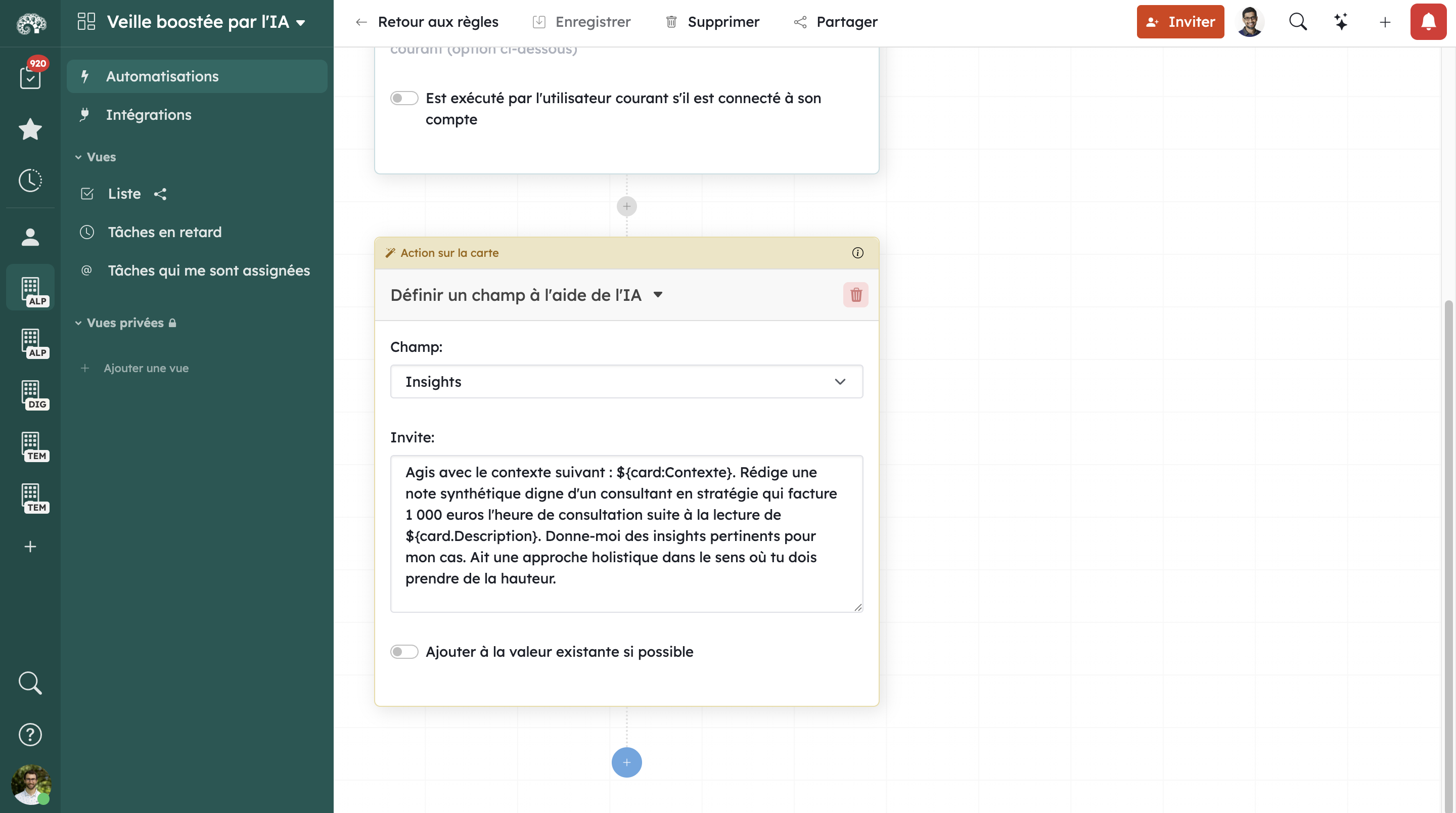
The AI assistant builds on Kantree’s native automation features to go even further. The two layers work together: AI understands your intentions, automations execute them at scale.
Combining AI and automation rules
You can, for example, ask the assistant to create an automation workflow by describing what you want in plain language. It translates your intent into rules configured in Kantree, which you can then adjust visually — no coding required.
Views and dashboards generated on demand
Kantree dashboards can be created or filtered via the AI assistant. Rather than manually configuring each widget, you describe the indicators you want to visualise and the AI handles the layout.
An AI that knows your project data
Unlike a generic assistant, Kantree’s AI has access to your entire workspace: your projects, tasks, comments and custom fields. It responds with precision because it knows your context — not just because it was trained on generic data.
What AI does not replace (and why that’s good news)
Kantree’s philosophy is explicit: AI is there to serve teams, not to short-circuit them. Some decisions will always remain human — and that is a strength, not a limitation.
AI excels at handling volume, structuring unstructured information and automating low-value repetitive tasks. But client relationships, strategic decision-making, team conflict resolution and crisis arbitration remain areas where human judgement is irreplaceable.
If 2023–2024 was the era of chatbots, 2025–2026 is the era of autonomous agents — systems capable of planning sequences of actions, using tools and observing results to adjust their strategy. In this context, tools that integrate AI as a co-pilot rather than a replacement — as Kantree does — offer the best balance between performance and control.
How to get started with the Kantree AI assistant
Step 1: activate the assistant from your workspace
The AI assistant is accessible directly from your Kantree interface. No prior technical configuration is needed: it is available natively on eligible plans.
Step 2: start with one concrete use case
Don’t try to automate everything at once. Identify a repetitive task that costs you time every week — a report consolidation, a recurring ticket creation, a search for information across your projects — and test the assistant on that specific scope first.
Step 3: progressively enrich your workflows
Once you are comfortable with the conversational assistant, explore smart filters and document data extraction. Then combine these features with Kantree automations to industrialise the processes that are worth it.
Step 4: train your teams through use
One of the major advantages of a plain-language AI: the learning curve is almost flat. Run a 30-minute demo session with your teams, let them experiment freely — adoption follows naturally.
FAQ: frequently asked questions
Does the Kantree AI assistant work in English? Yes. The Kantree AI assistant understands plain language naturally. You ask your questions just as you would to a colleague, with no special syntax or query language to learn.
Do you need technical skills to use AI in Kantree? None at all. The Kantree assistant is specifically designed to make automation accessible to business teams, with no dependency on IT. Creating filters, tasks or extracting data is done entirely in natural language.
Is my data secure when I use Kantree AI? Kantree hosts its data in Europe and is natively compliant with GDPR. The AI operates within the secure perimeter of your workspace — your data is not used to train external models.
Can I upload any type of document to the AI assistant? The assistant supports PDFs and other common document formats. You can upload quotes, CVs, reports or specification documents — the AI extracts the key points and structures them directly in your Kantree projects.
Is the Kantree AI assistant included in all plans? The AI assistant is available on plans that include this feature. You can test all features during the 15-day free trial, with no credit card required.
Conclusion
AI and workflow automation are no longer reserved for technical teams. With the AI assistant built natively into Kantree, every team member can save time, structure information more quickly and make better decisions — simply by asking questions in plain language.
The real promise of AI in project management is not to replace your teams: it is to free them from tedious tasks so they can focus on what matters. Kantree has embodied this vision from the ground up.
Ready to see concretely what the AI assistant can do in your context? Try Kantree free for 15 days and discover for yourself how to transform your workflows.
Try the Kantree AI assistant for free
Create tasks, filter your projects and extract data from your documents — in plain language, starting today.
15-day free trial • No credit card required
To go further
3 possibilities are available to you if this topic interests you:
-
1
Try Kantree here, it is free and you don’t need any credit card
-
2
If you want to learn more about how Kantree can adapt to your challenges, make an appointment with an expert on your use case.
-
3
Are you willing to join +1500 professionals receiving our advices and news on digitalization, collaboration, productivity? Register to our newsletter here.
If this article has been useful to you, consider sharing it. You can do it easily below.